

Take a look at our guide

FAQs
You can pay online, either on our website, MyGO, the GO app or using the Internet banking feature offered by your bank. Please note that payments made through internet banking may take up to 3 working days to be processed. You can also view and ask questions about your recent bill information and bill payment details to the ChatBot, available via WhatsApp (+35679707970) Facebook Messenger (Facebook page) or Live Chat.
GO Website
The bill payment option on the main website is available through Quick links in the top right corner, and for that, you will need to know the account number. You can pay your own bill or of someone else. The account number can be found on your bill, at the top of the page.
MyGO
1. If you have any pending bills, a card will appear on the main page. You can click on the ‘Pay now’ button.

2. You can also click on the respective billing account. Here you will be able to view your current bill, while you can also view bills for the last 12 months.
3. Click on the ‘Pay now’ button found on the card at the top of your screen. If you are registered for Direct Debit Mandate, a message will appear at the top to inform you accordingly.
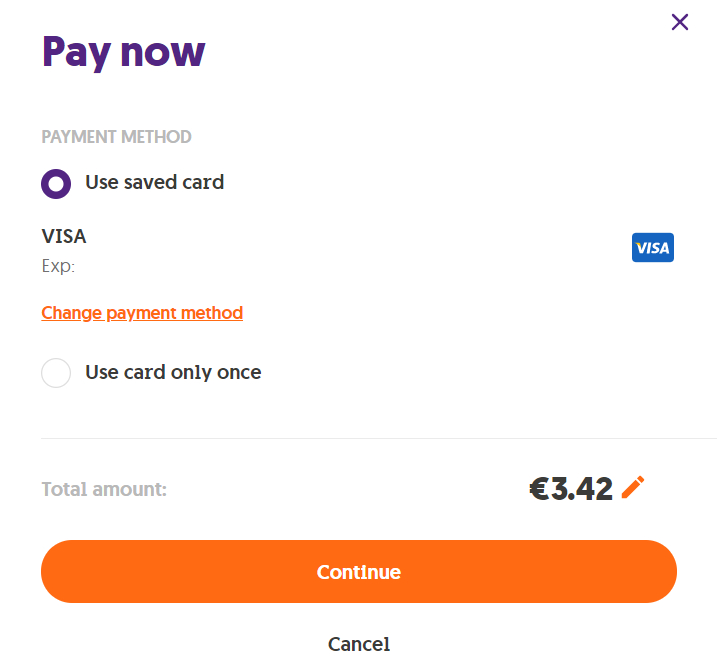
4. If not and you have clicked on ‘Pay now’, a new pop up will appear in the middle of the page, where you can enter your card details. You have an option to save a banking card for future payments, or else use a banking card only for this specific payment. Once you enter your card details, click on ‘Continue’.
GO app
1.Log in to the GO app and click on ‘Payments’ on the menu, found at the bottom of your screen. Depending on your services, you’ll see a card with the amount due.
2. Here you will be able to view current bills, as well as bills issued for the last 12 months.
3. Click on ‘Pay now’ found in the account’s card.
4. A new page will appear where you can enter your card details. You have an option to save a banking card for future payments, or else use a banking card only for this specific payment. Once you enter your card details, click on ‘Pay now’.
GO ChatBot
You can easily view and ask questions about your recent bill information and bill payment details to the ChatBot, available via WhatsApp (+35679707970) Facebook Messenger (Facebook page) or Live Chat. Simply provide the ChatBot with your billing account number and registered identification against the account, and ask your queries! The ChatBot has been trained to answer questions related to billing and bill payment matters.
Paying by Direct Debit Mandate (DDM) couldn’t be easier. Once you set it up, we will automatically issue direct payments from your preferred bank account on the last working day of every month.
If you have not set up DDM, you can do so via MyGO by following these steps. All you need to set this up is your bank account’s IBAN number. If you don’t have this, you can easily convert your bank’s account number to an IBAN from your bank’s website. Just bear in mind that we currently accept DDM details from the following banks: APS, BNF, BOV, HSBC, Lombard, MeDirect and Revolut and note that the DDM must be registered under the account holder’s name.
Questions & Answers on DDM